iPhone + Apple Watch

Your health, connected.Your next step, clearer.

Velqiri turns your Apple Watch sleep, recovery and strain into one clear picture, and a coach that explains what changed and gives you one next step.

Available on the App Store for iPhone with Apple Watch. Wellness guidance only — not a medical device and not a diagnosis.

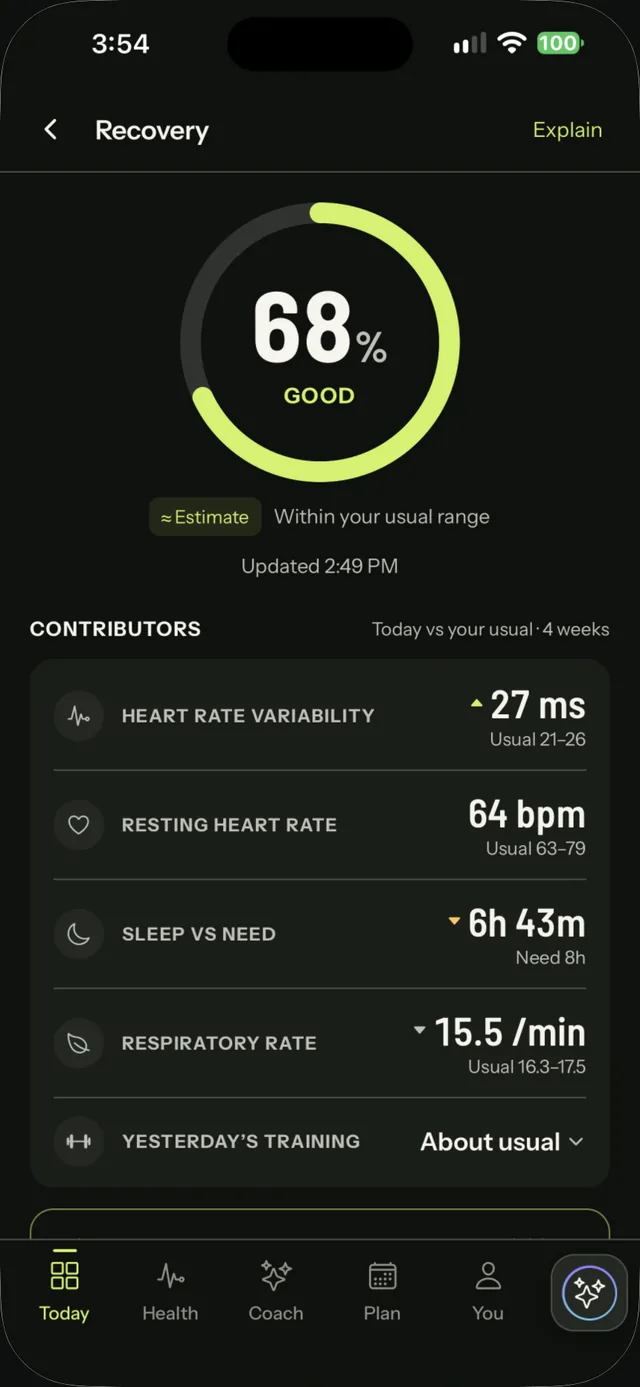
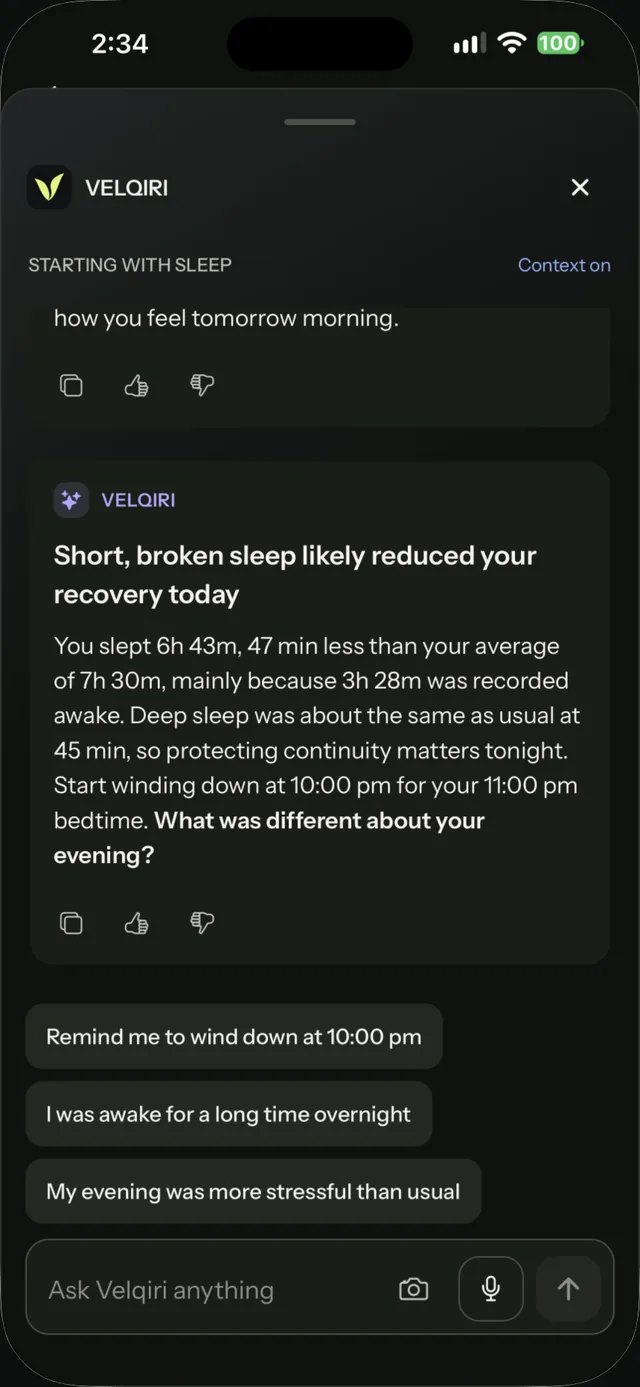
Actual app · real Apple Watch dataVelqiri Recovery screen: 68%, good, within your usual range, with heart rate variability, resting heart rate, sleep and respiratory rate against your usualVelqiri coach insight on the Sleep screen: short, broken sleep likely reduced recovery today. 6h 43m asleep, 47 minutes under a 7h 30m average. Start winding down at 10:00 pm, then a question and three reply chips
  • Recovery, sleep & all-day strain
  • A coach insight on every screen
  • Log meals in your own words, reviewed before saving
  • Optional Apple Health sync

Your health has a story. See it come together.

See the pattern, understand why, then take one clear next step. Everything is compared with your own usual, not someone else's.

01 — YOUR DAY

Recovery, sleep and strain, read against your usual

  • Recovery puts HRV, resting heart rate, respiratory rate and sleep next to your usual range from the last four weeks.
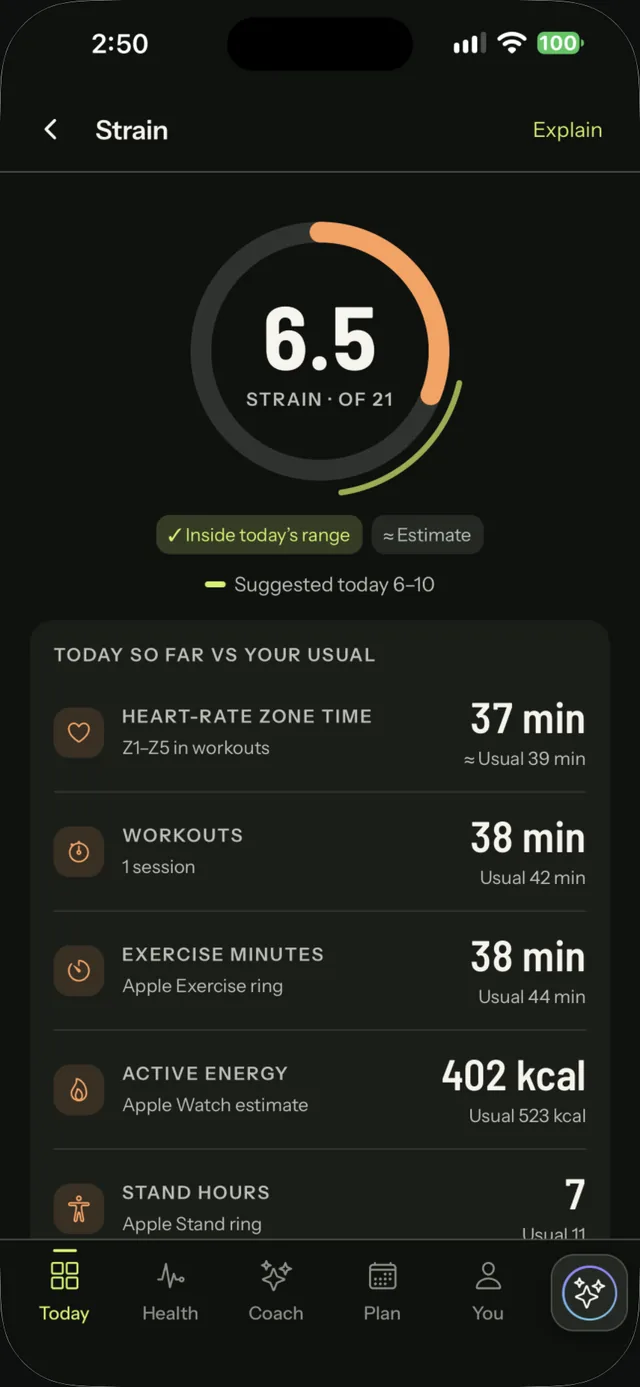
  • Strain counts all-day heart rate, not just workouts, with a suggested range that follows your recovery.
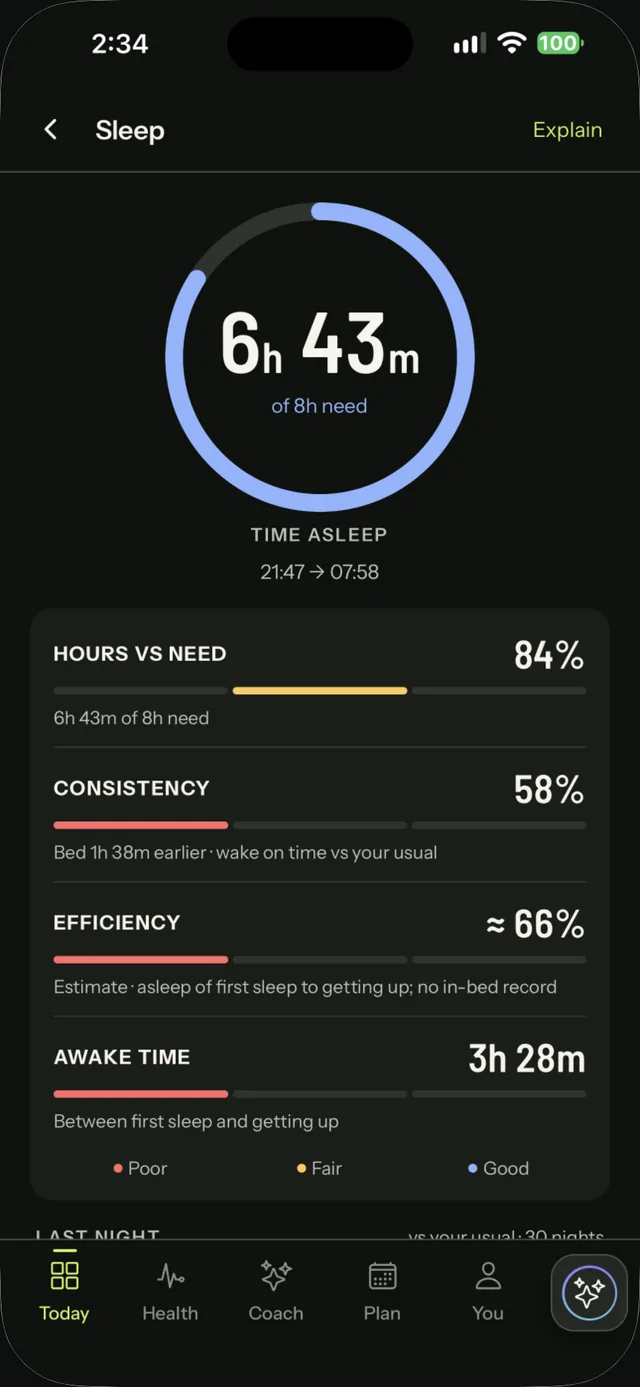
  • Sleep keeps recorded awake stretches inside the night, so a long wake-up stays one night.
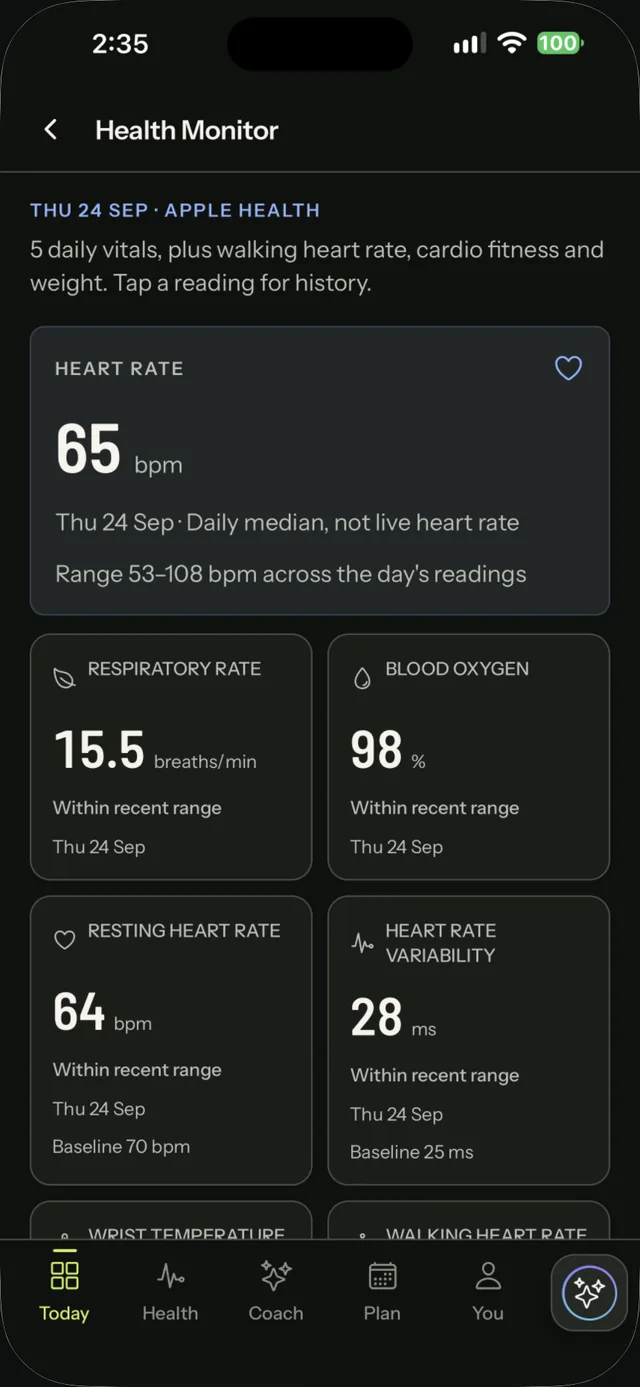
  • Health Monitor shows your daily vitals against your recent range, and only the ones your Watch model records.

Scores are wellness estimates that show their inputs, not clinical interpretation.

02 — COACH

Every screen opens with the why

Open any screen and the coach has already read it: a plain headline, the numbers behind it, one action with a time (“start winding down at 10:00 pm”), a question, and reply chips you can tap.

Say “gym this evening” and your plan moves with you. Chat in the language you write in, Hinglish included.

Ask anytime. The coach also checks in at moments of your day you keep on, such as after you wake or after a workout. AI can make mistakes, so check anything important.

03 — FOOD

Log a meal the way you say it

Type “2 roti, dal chawal”, tap a portion, and the coach drafts calories, protein, carbs and fat, plus optional estimates of fiber, sugar, saturated fat, sodium, iron, calcium, potassium and vitamin C.

Estimates are labelled, and nothing is saved until you confirm. Macro nudges follow your goal.

04 — LABS

PDF lab reports, reviewed first

Upload a lab PDF and check the extracted values before they join your history. Once confirmed, food suggestions can take recent out-of-range, diet-related markers into account.

Food ideas only, never supplements or doses, and a pointer to your clinician.

05 — SLEEP

A bedtime that fits your nights

Bedtime and wind-down come from your own usual nights, nudged toward the sleep you need. The coach names one evening time and can remind you.

Evening guidance for better nights, not a sleep assessment.

06 — WORKOUTS

More than a duration

Workouts show heart rate recovery and Apple's effort score, along with the Watch model that recorded them. Walking heart rate and stand hours round out the day.

07 — PROGRESS

Milestones, streaks and your own past

Earn milestones, keep a Watch-wear streak, and look back across weeks and months with reviews you can export. A gentle midday check asks if you'd like to log a meal when nothing is logged yet.
A closer look

From your night
to your next move.

The app itself, up close. Real iPhone captures from the developer's own Apple Watch data, shared with permission (one workout on Strain was added for illustration), plus Apple Watch simulator captures.

How it works

Four steps, and you stay in control at each one.

STEP 01

Connect, if you want

Create your account and choose whether to sync Apple Health. Notifications are offered at the end of onboarding, and you can change both later.

STEP 02

See the pattern

Recovery, sleep and strain sit together on Today, each compared with your own usual.

STEP 03

Ask the coach

Every screen opens with the coach's read and one timed next step; tap a reply or ask anything.

STEP 04

Review & confirm

Meals from a few words, food drafts and lab values: you review them before they join your log.

Apple Watch companion

Your day, on your wrist.

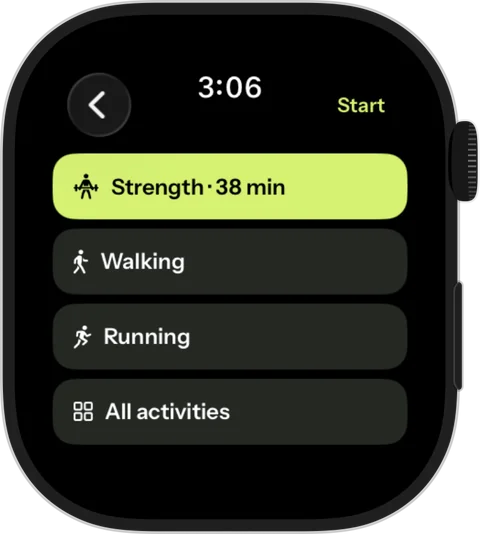
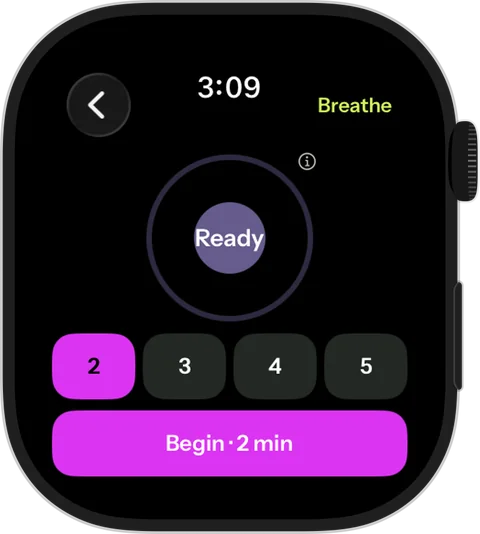
Glance at your morning, start a session, breathe for two minutes. The iPhone app fills in the detail.

  • Recovery and today's plan at a glance
  • Live heart rate, zones and energy during a workout, with pause, resume and finish
  • A target heart-rate zone cue, a strength rest timer, water lock, and pool or open-water swims
  • Guided breathing and quick check-ins
  • Saves to Apple Health; the iPhone app holds your full history
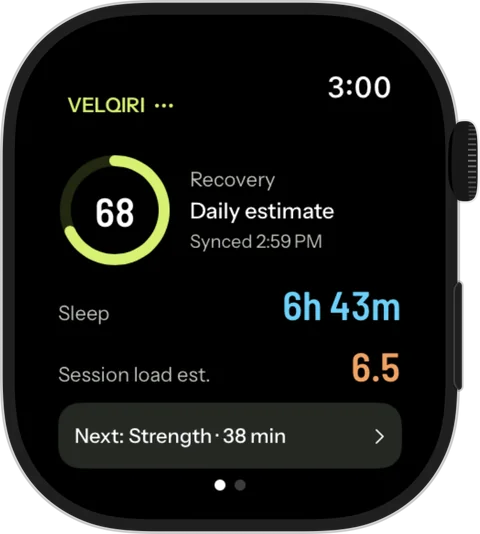
Velqiri Watch summary with recovery 68, sleep 6h 43m and the next planned session
Actual Watch app capture

Consent first. Clear about what goes where.

Health data is personal. Velqiri asks before it uses it, tells you where it goes, and gives you ways to leave.

Apple Health is your choice

Grant or revoke Apple Health access at any time in iOS Settings and in the app. Velqiri reads only the categories you allow.

An AI coach, named providers

Velqiri's coach is an AI and part of the app. It sends only what each reply needs to the AI providers named in our Privacy Policy, through OpenRouter, and they are told not to keep it or train on it. You agree to this before anything is sent.

Export or delete, anytime

Export everything in one complete file, or delete your account, from Privacy & data in the app. We never sell your data or use it for advertising.

Wellness, not diagnosis

Velqiri is not a medical device. It doesn't diagnose or treat conditions, and AI responses can be wrong. Talk to a clinician about medical concerns.

The details are in our Privacy Policy and Terms of Use. Velqiri is for adults aged 18 and over.

Questions

More answers on the Support page.

Where can I download Velqiri?

Velqiri is available on the App Store for iPhone, with a companion Apple Watch app. Use the Download on the App Store button at the top or bottom of this page.

Is Velqiri free?

Coach features are part of Velqiri Premium, with a free trial where Apple offers one. Your records, basic workout recording, export and deletion stay free. Apple shows the price before you confirm.

Can I try it without an account?

No. Velqiri needs an account, because your history, coach conversations and reviews are kept in it. There is no sample tour.

Do I need an Apple Watch?

The iPhone app is the core experience, and an Apple Watch is recommended. The Watch app shows your day at a glance, records workouts with live metrics, and offers breathing and check-ins. Sleep, recovery and the Health Monitor need the Watch worn overnight. Some vitals are recorded only by certain Watch models.

Do I have to connect Apple Health?

It's your choice. Sleep, recovery, strain and the Health Monitor are built from Apple Health, so without it those screens have little to show. You can still log meals, check in and talk to the coach.

Does the coach message me automatically?

Yes, at a few moments of your day that you keep on, such as after you wake, after a workout and in the evening. If you log meals and nothing is logged by early afternoon, you get a gentle nudge. Notifications are offered at the end of onboarding. At most two notifications a day, never during quiet hours, and you can silence any moment. You can also ask the coach anything, anytime.

Is this medical advice?

No. Velqiri provides wellness information and suggestions. It doesn't diagnose, and AI can make mistakes. For health concerns, consult a qualified professional.

Are the numbers on this page real?

The iPhone captures are real screens with the developer's own Apple Watch data, used with permission. One workout on the Strain screen was added for illustration. Watch images are Apple Watch simulator captures in Apple's device frame. They are not medical results.

One clear next step.

Velqiri is on the App Store for iPhone and Apple Watch. Download it, connect Apple Health, and see what today asks of you.